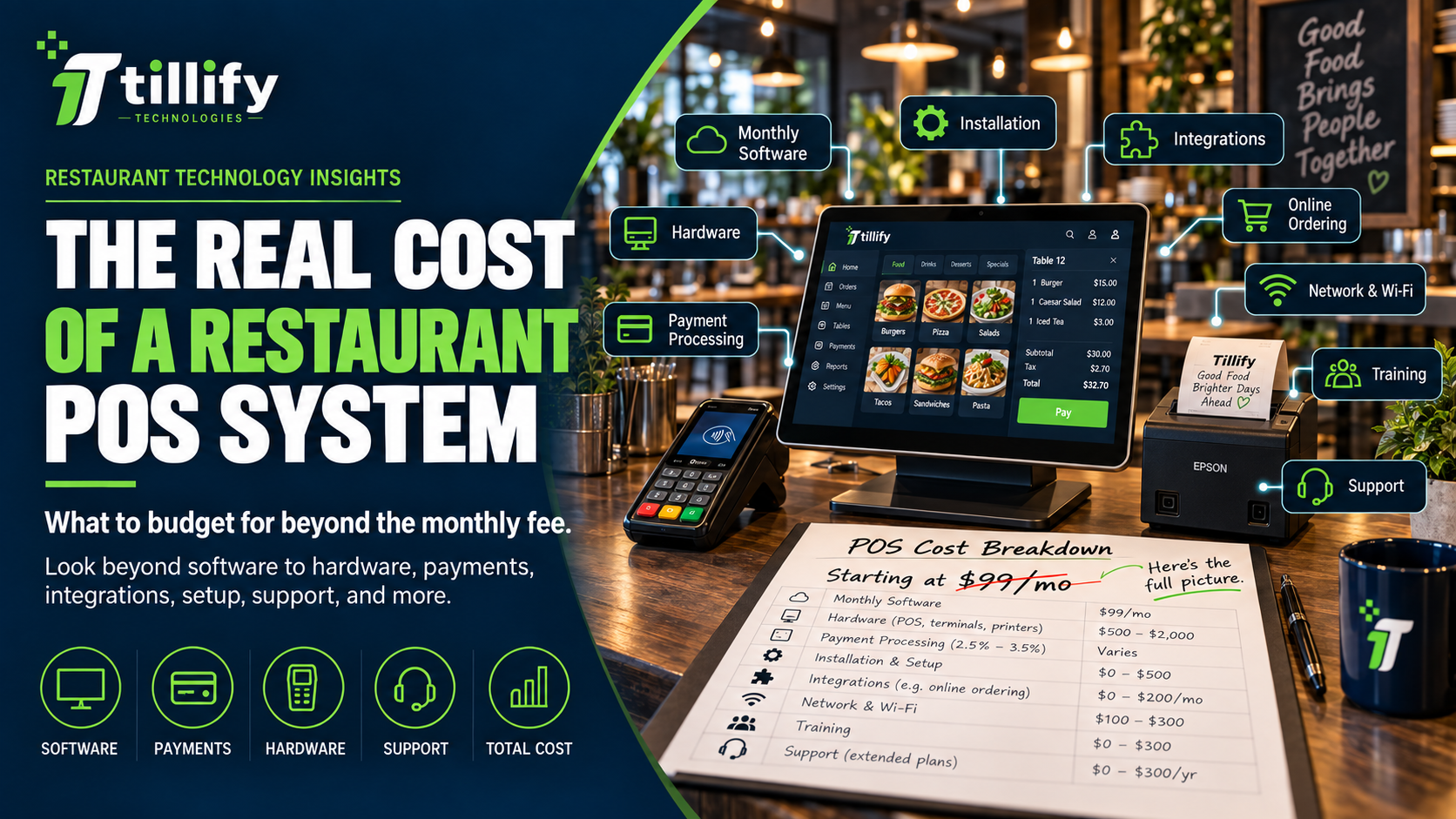
The Real Cost of a Restaurant POS System
Restaurant POS pricing can look simple at first.
A provider advertises software for a set monthly fee. Add a terminal or two, connect payment processing, and you're ready to go. Except that's rarely the whole cost.
For most restaurants, the monthly software subscription is only one component of a much broader technology investment. Hardware, payment processing, integrations, installation, networking, online ordering, support, training, and contract terms each contribute to a POS system's long-term cost. Consequently, evaluating POS options based solely on the advertised monthly price can lead to flawed decisions by overlooking critical cost drivers that may significantly affect the restaurant’s operating budget and overall return on investment.
The better question is: What will this POS system cost my restaurant to own and operate?
Here's what restaurant owners should include when evaluating the real cost of a POS system.
1. Monthly POS Software Fees
This is usually the easiest cost to identify.
Most modern restaurant POS systems charge recurring software fees based on some combination of:
- Number of locations
- Number of terminals
- Number of users
- Features
- Service level
- Modules or add-ons
A basic package may include order entry, payments, and reporting. Additional functionality may cost extra.
That can include:
- Online ordering
- Loyalty
- Gift cards
- Inventory
- Scheduling
- Kitchen display systems
- Advanced reporting
- Multi-location management
- Marketing tools
When comparing pricing, don't just ask: "How much is the software?"
Ask: "What functionality is included in that price?"
Two systems with similar monthly fees may include very different capabilities.
2. Hardware Costs
Hardware can represent a significant upfront investment.
Depending on your restaurant, you may need:
- POS terminals
- Handheld devices
- Payment terminals
- Guest-facing displays
- Cash drawers
- Receipt printers
- Kitchen printers
- Kitchen display screens
- Kiosks
- Barcode scanners
- Network equipment
Some providers sell hardware outright; others lease it.
Some offer discounted or "free" hardware in exchange for payment-processing commitments or longer contracts. Make sure you understand whether you are buying, financing, leasing, or borrowing the equipment. Also ask whether you can reuse the hardware if you ever change POS providers. Proprietary hardware may have little value outside that specific ecosystem.
3. Payment Processing
For many restaurants, payment processing will cost significantly more over time than the POS software itself. That makes it one of the most important expenses to understand.
Processing pricing may include:
- Percentage of each transaction
- Per-transaction fees
- Different rates for card types
- Keyed-entry fees
- Online-ordering rates
- Chargeback fees
- Monthly account fees
- PCI-related fees
- Other processor charges
Some POS systems require you to use their payment processing, while others allow you to choose among processors. Neither model is automatically better. What matters is understanding the total arrangement. A difference that looks small on a single transaction can become substantial across hundreds of thousands, or millions, of dollars in annual card sales. When evaluating a POS, don't separate payment processing from the technology decision. They are often economically connected.
4. Installation and Implementation
Some POS providers include basic setup, while others charge separately for installation, menu programming, project management, or onsite assistance.
Implementation may include:
- Hardware installation
- POS configuration
- Menu programming
- Payment setup
- Printer routing
- Kitchen display configuration
- User permissions
- Reporting setup
- Integration setup
- Employee training
A lower-cost installation isn't necessarily a better deal if your management team ends up doing most of the work.
Ask exactly what implementation includes.
You should know who is responsible for each part of getting the system ready for opening or cutover.
5. Menu Programming
Menu programming is easy to underestimate. A simple coffee shop menu may take relatively little time to configure. A full-service restaurant with complex modifiers, happy-hour pricing, multiple menus, coursing, sizes, substitutions, and kitchen routing can be a very different project. The cost isn't just the time required to enter items. Poor menu configuration can slow down employees and create operational problems long after installation. If menu programming is included, determine how much support it actually provides. If it's not included, budget either money or internal staff time for it.
6. Network and Internet Costs
Your POS may depend heavily on the restaurant's network.
That can require additional investment in:
- Internet service
- Business-class router or firewall
- Network switches
- Wireless access points
- Cabling
- Cellular backup
- Network installation
- Ongoing monitoring or support
A restaurant opening with handheld ordering may require much better wireless coverage than one using only fixed terminals. Likewise, a restaurant with kitchen displays, online ordering, cameras, guest Wi-Fi, and multiple connected devices may need more robust network infrastructure. These costs may not appear anywhere on the POS quote.
They're still part of the project.
7. Online Ordering
Online ordering may be included, offered as an add-on, or provided through a third party.
Possible costs include:
- Monthly software fees
- Per-order fees
- Payment-processing fees
- Website integration
- Delivery marketplace commissions
- Menu synchronization
- Setup fees
Check whether online ordering transactions have a different processing rate than in-store transactions. Also determine whether online orders flow directly into the POS and kitchen or require employees to manage them manually. A less expensive online-ordering tool may cost more operationally if it creates extra work.
8. Third-Party Integrations
Restaurants often connect their POS to other systems.
Common examples include:
- Accounting
- Scheduling
- Payroll
- Inventory
- Reservations
- Loyalty
- Delivery
- Marketing
- Business intelligence
Integrations aren't always free.
The POS company, the third-party provider, or both may charge for the connection.
Before assuming two systems will work together, ask:
- Is there a direct integration?
- Is there an additional monthly fee?
- Who supports it?
- What information actually transfers?
- Does it require another middleware platform?
One or two integration fees may seem minor.
A restaurant using many platforms can accumulate meaningful recurring technology expenses.
9. Support and Maintenance
Support models vary considerably.
Some POS providers include 24/7 support in the monthly subscription. Others charge for premium service levels or onsite support.
You may also encounter costs for:
- Replacement hardware
- Extended warranties
- Onsite service
- After-hours support
- Managed network support
- Menu changes
- System maintenance
This is an area where price and value aren't always the same thing. Cheap support isn't helpful if you can't reach anyone when your restaurant is down during dinner service.
Understand both what support costs and what you're actually getting.
10. Employee Training
Training has both direct and indirect costs. You may pay the POS provider for formal training. Even if training is included, your restaurant still has to schedule employees, managers, and owners to participate. That time has value. Changing POS systems may also temporarily reduce productivity while employees adjust to new workflows. Factor that into your implementation plan. Good training can shorten the learning curve and reduce post-launch mistakes. Skipping training to save money can create much higher costs later.
11. Contract and Cancellation Costs
POS contracts deserve careful attention. A system may look inexpensive until you discover you're committed for several years.
Review:
- Contract length
- Automatic renewal
- Early termination fees
- Equipment commitments
- Payment-processing commitments
- Cancellation notice requirements
- Rate-change provisions
The cost of leaving a POS system can sometimes be almost as important as the cost of starting with one. If the restaurant changes direction, closes a location, or outgrows the platform, you want to understand your options.
12. Your Team's Time
This is one of the least visible POS costs.
Someone at the restaurant may spend hours:
- Building menus
- Updating pricing
- Managing users
- Fixing integrations
- Reconciling payments
- Creating reports
- Troubleshooting devices
- Contacting support
- Training new employees
A system that saves $100 per month but requires managers to spend several extra hours each week compensating for its limitations may ultimately yield a lower return on investment (ROI). This allocation of operational time diverts management from higher-value activities such as strategic planning, staff development, or guest engagement, potentially diminishing overall business effectiveness. Therefore, include the value of operational time in overall cost assessments, as POS inefficiencies can hurt key business outcomes like employee productivity, service quality, and profitability, even if these costs don't appear explicitly on invoices.
13. The Cost of Downtime
Finally, consider what happens when the system isn't working.
POS downtime can affect:
- Order entry
- Kitchen production
- Credit card payments
- Online ordering
- Reporting
- Guest experience
A reliable system may cost more upfront but create less disruption. Conversely, saving money on infrastructure, support, or backup connectivity may become expensive if the restaurant can't process transactions during a busy shift.
Technology decisions should consider both purchase price and operational risk.
Compare Total Cost, Not Sticker Price
When evaluating POS proposals, build a simple three-year cost comparison; for instance, compare two systems by calculating the total expense for software, hardware, and processing fees over thirty-six months. For example, consider Restaurant A, which selects System 1 at $69 per month in software fees with an average payment processing rate of 2.8%, and Restaurant B, which chooses System 2 for $99 per month with a lower 2.1% processing rate. While System 1 appears less expensive upfront, Restaurant A may pay significantly more in processing fees if its annual credit card sales exceed $500,000. Over three years, the cumulative processing charges could make System 2 the more economical choice. This practical comparison demonstrates how analyzing all long-term costs, rather than focusing solely on monthly software fees, provides a more accurate assessment of true overall value.
Include:
- Software
- Hardware
- Payment processing
- Installation
- Integrations
- Online ordering
- Support
- Networking
- Training
- Additional services
That gives you a much more realistic picture than comparing monthly subscription fees. It also makes it easier to identify where one provider may be inexpensive in one area but significantly more expensive in another.
Cheap and Expensive Aren't the Same as Good and Bad
The least expensive POS system isn't inherently unsuitable, nor is the most costly one necessarily superior. Key decision criteria for restaurant owners include aligning POS system features and capabilities with the business's specific operational needs. For example, a small establishment with limited requirements may benefit most from a simple, affordable solution, whereas restaurants operating across multiple locations or requiring complex integrations might need a more robust, feature-rich platform. Ultimately, decision-makers should weigh factors such as total cost of ownership, system reliability, functionality, and compatibility with existing workflows to select the POS solution that provides the greatest overall value for their particular context.
The Bottom Line
The real cost of a restaurant POS system goes far beyond the monthly software subscription.
Hardware matters.
Payment processing matters.
Integrations matter.
Implementation matters.
Support matters.
The time your employees spend working with, or working around, the system matters too. For example, if managers must regularly input sales data manually because of poor system integration, that time becomes a real operational cost. Before choosing a POS, calculate the total cost of the technology relationship. A slightly higher monthly fee may be worthwhile if the system saves time, reduces manual work, improves reliability, or eliminates other software. Likewise, an inexpensive system can become very expensive if it does not fit the restaurant.
Compare the total cost of operating the system, not just the price on the sales proposal.
Comparing Restaurant POS Systems?
Tillify Technologies helps restaurants evaluate POS technology based on the way they actually operate.
That means looking beyond advertised pricing to understand hardware, payments, integrations, implementation, support, and the long-term cost of ownership.
The right POS isn't necessarily the cheapest one. It's the one that delivers the right value for your restaurant.