
Your Point-of-Sale menu should make taking an order easier—not slow your staff down. Tillify Technologies helps restaurants build, organize, update, and clean up Point-of-Sale menus with the way your team actually works in mind.
Building a Point-of-Sale menu isn’t simply a matter of entering item names and prices. Categories, modifiers, sizes, substitutions, taxes, kitchen routing, online ordering, and dozens of other details determine how well the menu actually works.
A well-organized Point-of-Sale menu can make ordering easier for employees, simplify training, reduce unnecessary button presses, and help orders reach the right place.
Whether you’re building a brand-new Point-of-Sale menu, migrating from another system, or trying to clean up years of changes, Tillify can help.
Create items, categories, menu groups, pricing, descriptions, and other core menu configuration for a new or existing Point-of-Sale system.
Configure modifier groups, required selections, optional choices, substitutions, add-ons, sizes, and other ordering options.
Assist with item pricing, price levels, taxes, service charges, and other supported pricing configurations.
Help configure items so orders are routed to the appropriate kitchen printers, preparation areas, or supported kitchen displays.
Simplify cluttered menus, outdated items, confusing categories, redundant buttons, and modifier structures that have grown difficult to manage.
Assistance with new items, seasonal menus, price changes, modifier updates, limited-time offers, and other ongoing menu adjustments.
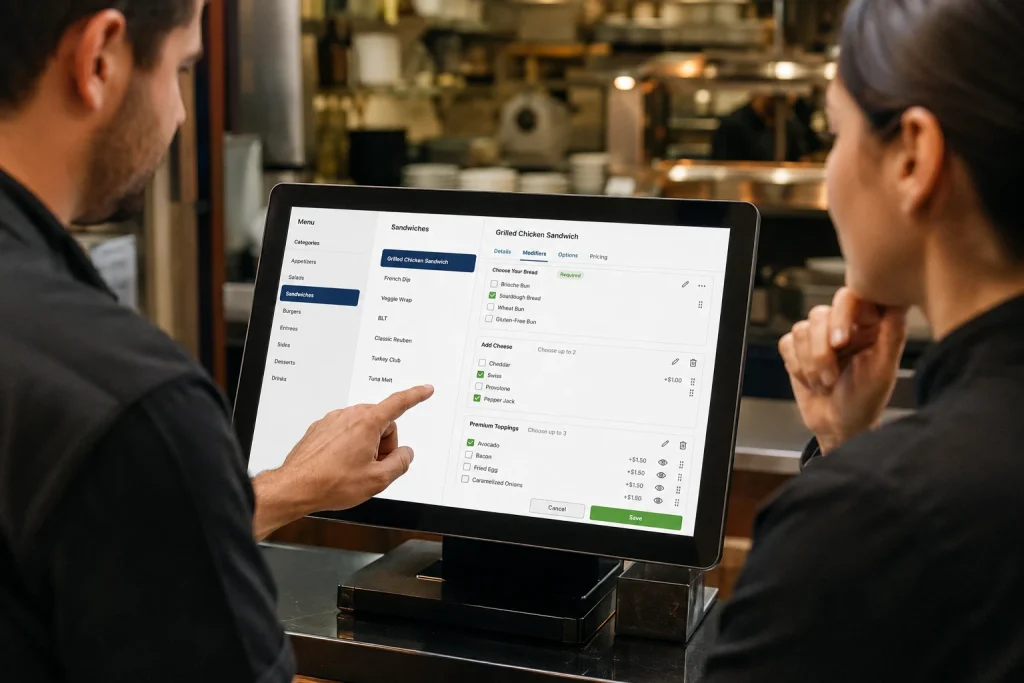
A Point-of-Sale menu can be technically correct and still be difficult to use.
If employees have to hunt through multiple screens to find an item, navigate confusing modifiers, or remember workarounds just to enter a common order, the menu isn’t doing its job.
Tillify looks at the menu from the employee’s point of view. How are orders actually taken? Which modifications are common? Which buttons need to be easy to reach? What information does the kitchen need?
We review your existing menu, Point-of-Sale environment, ordering workflow, and the changes or new configuration you need.
Items, categories, modifiers, pricing, routing, and other requirements are mapped out before the menu is built or changed.
We work through the supported Point-of-Sale configuration while keeping usability and restaurant operations in mind.
The menu is reviewed for accuracy, organization, modifier behavior, routing, and other important configuration before use.
Modifiers are one of the most important and easiest to overcomplicate parts of a restaurant Point-of-Sale menu.
Tillify can help organize modifier groups around the choices your guests actually make and the information your employees and kitchen actually need.
Configure selections that employees must make before sending an item, such as temperature, size, side choice, or preparation method.
Organize additions, removals, substitutions, extras, and special requests without overwhelming the ordering screen.
Configure supported upcharges and pricing rules so common customizations are easier to enter consistently.
Restaurant Point-of-Sale menus tend to grow over time. New items get added. Old items never disappear. Duplicate buttons show up. Modifier groups get reused where they don’t quite belong. Employees learn workarounds and eventually nobody wants to touch the configuration.
Tillify can help review an existing Point-of-Sale menu and identify opportunities to make it cleaner and easier to navigate.
Moving to a new Point-of-Sale platform is an opportunity to do more than recreate your old menu button-for-button.
Tillify can help organize the information needed for your new menu, identify areas worth cleaning up, and assist with preparing or programming supported menu configuration for the new system.
If you’re moving to a new Point-of-Sale, we can also help coordinate the broader transition through our Point-of-Sale onboarding and installation services.
Help organizing the hardware, menu, integrations, configuration, and other details needed to prepare for a new Point-of-Sale launch.
Professional installation of terminals, printers, payment devices, kitchen technology, networking, and peripherals.
Ongoing assistance with Point-of-Sale technology, printers, hardware, connectivity, configuration, menu changes, and troubleshooting.
Yes. Tillify can assist with supported POS menu builds, including items, categories, modifiers, pricing, routing, and other configuration. Contact us with your POS platform and project requirements to discuss the scope of your menu.
Yes. If your existing POS menu has become cluttered or difficult to use, we can help review its organization and assist with restructuring items, categories, modifiers, and other supported settings.
Yes. Modifier configuration can include required choices, optional selections, substitutions, add-ons, preparation options, pricing, and other supported menu settings.
Yes. Tillify can assist with menu changes such as new items, pricing updates, modifiers, seasonal offerings, categories, routing, and other supported POS configuration.
Yes. Tillify can help restaurants organize and prepare menu information when moving to a new POS platform. Depending on the system, we may also be able to assist with programming and configuration.
Yes. We can assist with supported menu routing configuration so items are directed to the appropriate kitchen printers, preparation areas, or kitchen display systems.
Yes. In addition to menu programming, Tillify provides POS onboarding and professional installation services to help restaurants prepare for a new POS system and get their technology ready for go-live.
Whether you need a brand-new menu, help cleaning up an existing one, or someone to tackle ongoing changes, tell us about your Point-of-Sale system and what you’d like to improve.
We use cookies to personalize content, provide social media features, and analyze our traffic. We also share information about your use of our site with our analytics partners. You can change your preferences at any time. For more information, please see our Privacy Policy and Cookie Policy.